Designing a B2B campaign management dashboard with AI-assisted design
Transforming RGN's manual campaign workflows into a self-serve portal with systems thinking and role-based permissions.
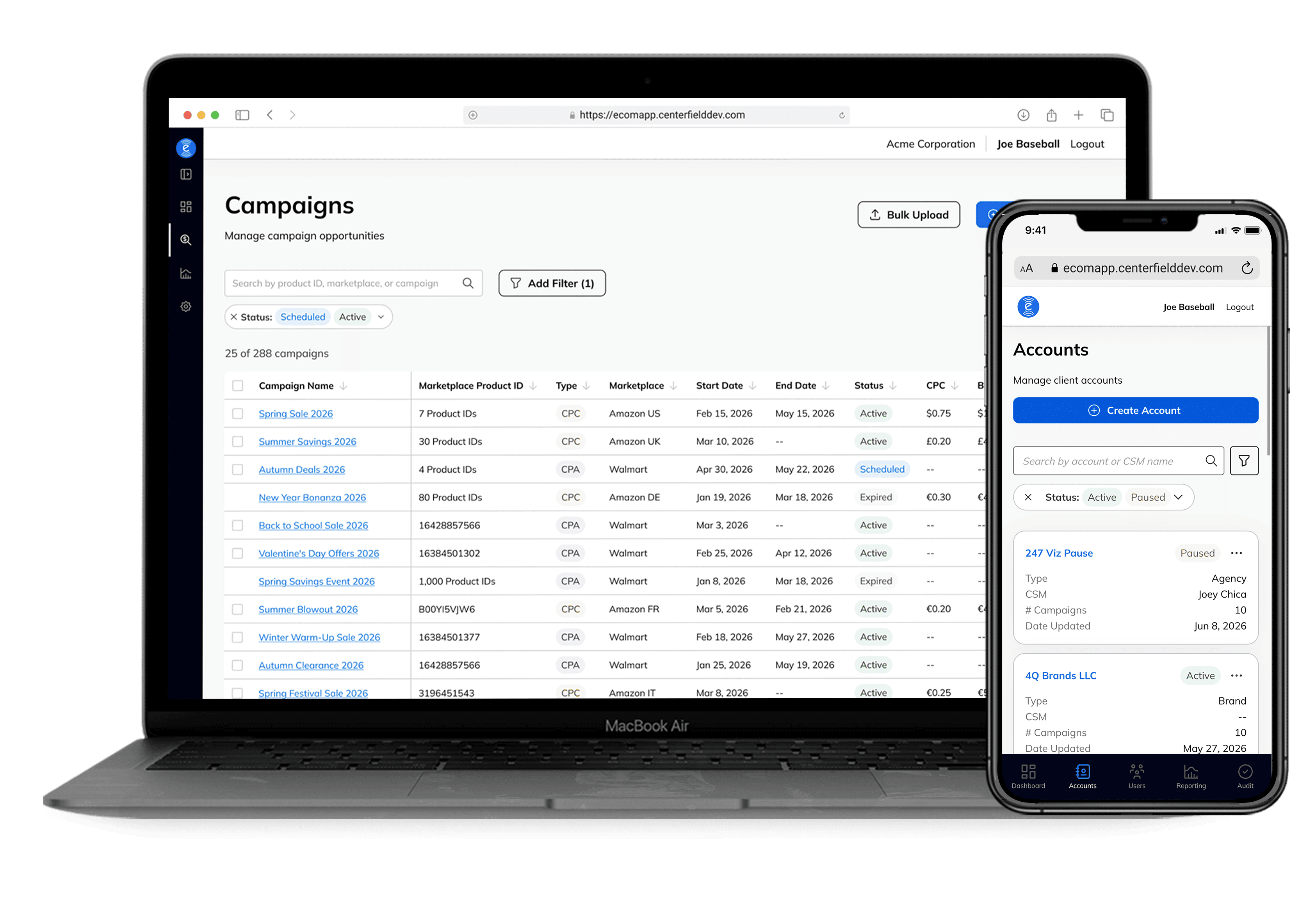
overview
Centerfield's Retail Growth Network (RGN) helps brands and aggregators manage product campaigns that drive traffic through sites and social media to marketplaces like Amazon and Walmart, earning commission (CPA) or per-click (CPC) revenue. However, the program ran entirely on spreadsheets, costing real revenue as the business scaled. I led the design of a self-serve client portal, leveraging AI to accelerate design exploration, iteration, and development handoff under a compressed 90-day timeline.
50%
Setup Time Saved
$3-4K
Daily CPC Earnings
10,000
Campaigns Per Action
project timeline
Mar - May 2026 · 90 days
my role
Product Designer
team
Product, Engineering, QA, Product Leadership)
my design skills in focus
0-to-1 Product Design
B2B SaaS
AI Tools

the problem
One wrong date input, in a slow manual process, cost a client 90% of their invoice

Every campaign update, upload, and reporting request depended on internal users, including sales and client success managers (CSMs), manually editing a PPL spreadsheet. With no built-in validation, one incorrect promotion end date reduced a client’s monthly invoice from $10,000 to $1,000. As RGN grew toward hundreds of client accounts, both problems became a scaling bottleneck.
the solution
Building a faster, self-serve portal with safeguards against campaign errors
I designed a self-serve portal that brings campaign uploads, edits, and reporting into one platform. Built-in validation, business rules, and audit history help users catch errors before campaigns go live and make changes easier to track, reducing reliance on manual intervention.
Self-Service
Clients can manage campaign uploads, edits, and reporting directly.
Built-In Safeguards
Validation and audit history catch errors and make changes traceable.
Built to Scale
Designed for hundreds of accounts and 10,000 campaigns in a single bulk action.
the context
How does RGN work and who uses it?
Brands and aggregators upload campaigns into RGN; Centerfield's marketing channels (social, product reviews) drive traffic to those promotions on marketplaces like Amazon and Walmart; sales and commission data flow back into reporting. CSMs manage these client relationships.
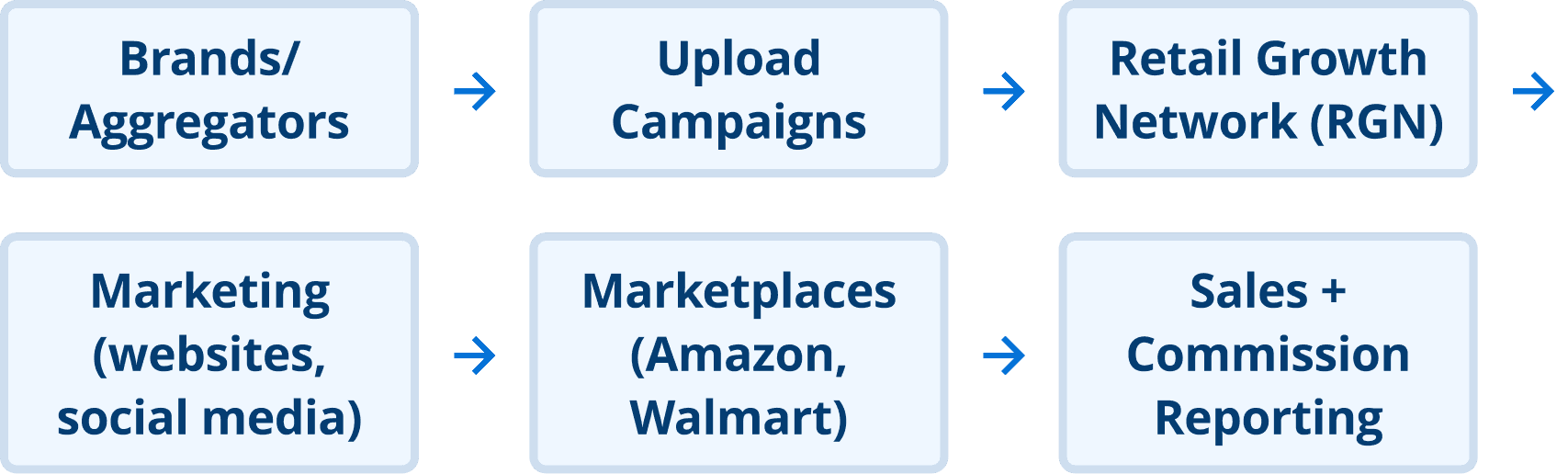
The new portal holds six different role types
Each client organization is represented by an account, with individual users receiving permissions based on their role. The portal supports three internal and three external roles, ranging from platform-wide management to view-only access.
the scope
Everything we built in 90 days
This project covered the core client campaign workflows and the internal tools needed to manage accounts, permissions, validation, and change history.
In Scope
Campaign management and reporting
Accounts, roles, validation, and audit trail
Multi-marketplace support
Out of Scope
Data warehouse (exists in BigQuery)
Internal reporting (exists in Looker Studio)
Invoicing and billing

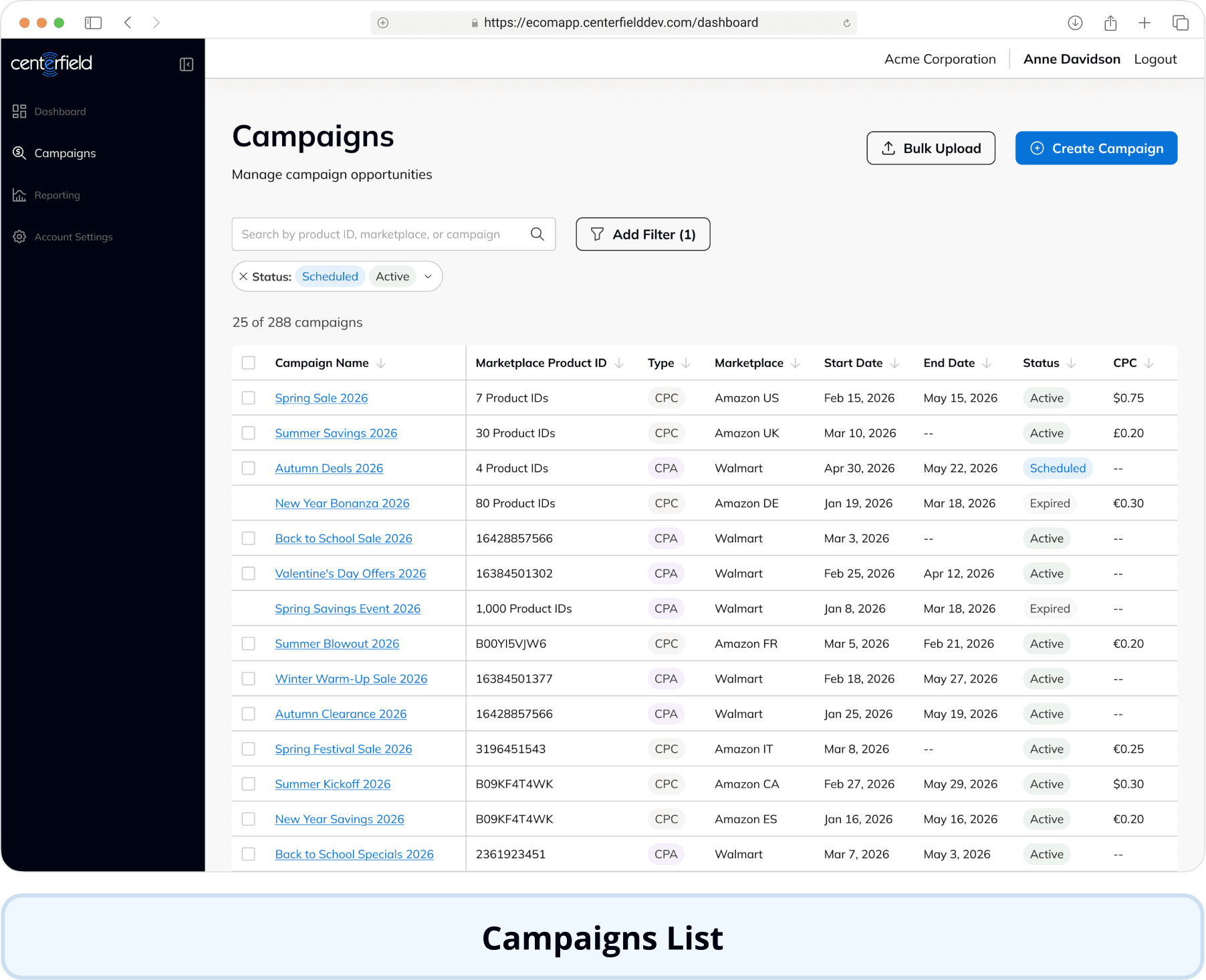
Client-facing design overview




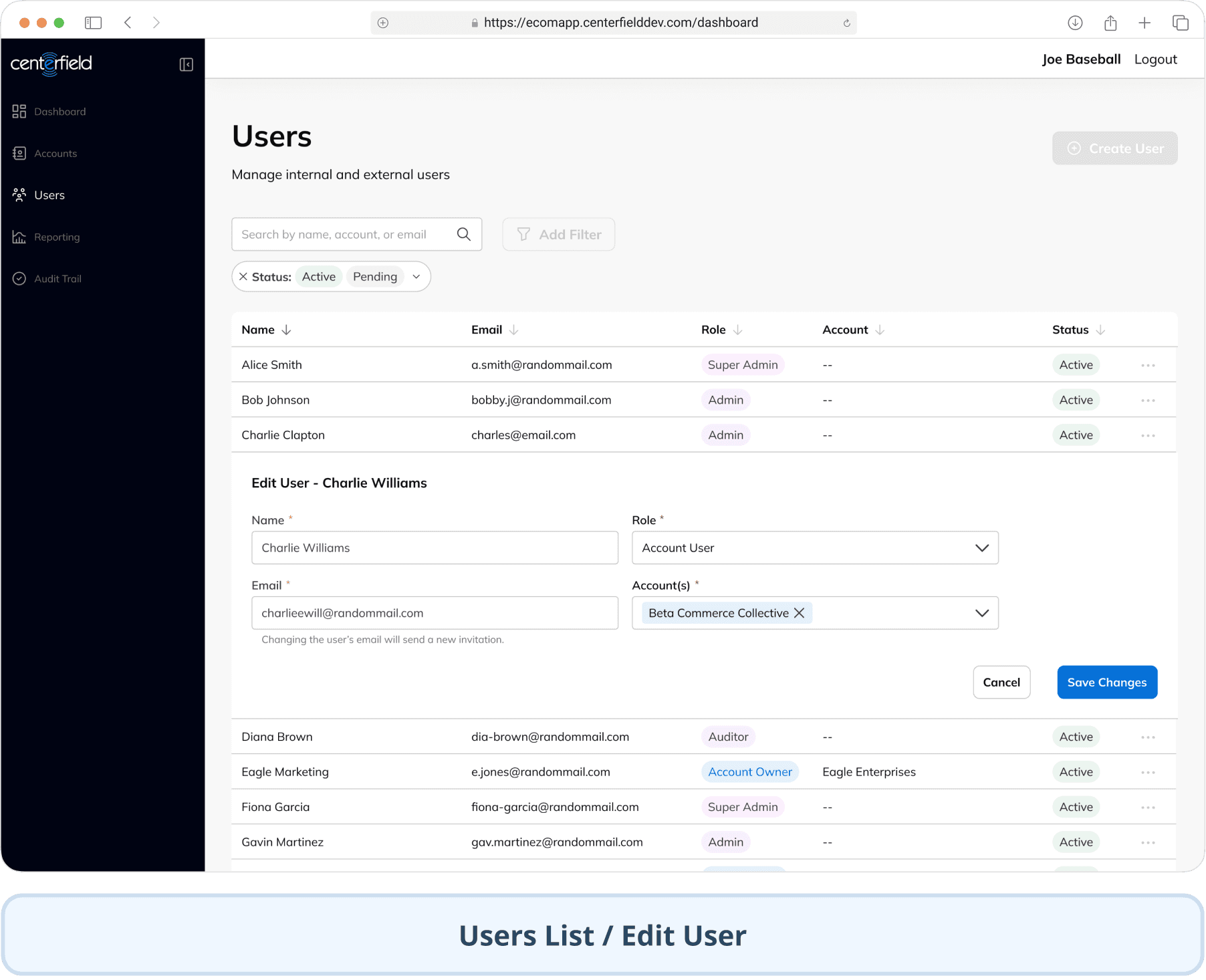
Internal-facing design overview




ai in design
Finding the right role for AI in my process
A workflow that got 35% faster in one week


In the first week, I used ChatGPT to structure requirements and Figma Make to generate early concepts. However, edge cases surfaced after I’d rebuilt polished designs in Figma, which created extra rework.
By the second week, I moved edge-case discussions earlier and shared generated prototypes with product and engineering before refining them. This reduced my design workflow time by 35% while giving the team earlier opportunities to shape the solution.
Aligning my designs with how engineering built using AI
I adapted my handoff to support the way Thomas (front-end engineer) was building with Claude Code. Through our weekly syncs, I learned that detailed annotations clarifying behavior, interaction states, and open questions were more valuable for implementation than designing every scenario frame by frame in Figma.

Yuko (Myself)
Designer

Thomas
Front-End Engineer
Structured Figma files for Claude Code
→ Detailed dev annotations for Claude to read and implement.

I additionally built a design system auditing tool

Audit Lab flagging design-system violations directly in the file
the designs
Evolving the designs to changing requirements
We began with a high-level PRD from Neal (product director) with technical and UX details expected to follow. However, under the 90-day timeline, it became our working source of truth before some important gaps had been resolved. I continued moving the designs forward, keeping in mind we may need to revisit design decisions as requirements continued to evolve.
Adapting RGN’s campaign workflow to support CPC (cost-per-click)
RGN originally supported only CPA (cost-per-acquisition) campaigns, where brands paid a commission for each sale. When Amazon stopped supporting CPA attribution during the build, we needed to add CPC (cost-per-click) campaigns, where brands pay per click instead of per sale.
Shifting the focus from products to campaigns
A CPA promotion was tied to one product ID, so the original campaign list was organized around products. A CPC campaign could contain thousands of product IDs, making that structure difficult to scan. I shifted the hierarchy to campaign name and moved product-level detail into the Campaign Details page.

Keeping bulk editing simple across campaign types
Before CPC, bulk editing was straightforward because every campaign shared the same fields. Supporting two campaign types introduced different rules: CPC campaigns had budget and cost-per-click fields, while CPA campaigns had a commission rate. Rather than disabling rows or blocking mixed selections, I kept every campaign selectable. The fields available in the edit drawer changed based on the selection, allowing users to complete a valid bulk edit without starting over.

Before CPC addition—having only CPA campaigns made editing fields uniform

After CPC addition—mixed selections show only fields available across the selected campaigns.
When promotions overlap, do we “block” or “chop”?
Without manual review, RGN needed one rule for overlapping campaigns. Neal, Aliya, and I mapped scenarios across manual creation, CSV uploads, sidebar edits, and API calls, then compared blocking the new campaign with “chopping” the existing evergreen campaign when the new one began.


Neal, Aliya, and I held a dedicated working session to map scenarios across manual creation, CSV uploads, sidebar edits, and API calls, then agreed on how each should behave.
Our potential approaches were:
Block (A): Reject overlapping promotions entirely.
Chop (B): Automatically end the existing promotion when the new one starts (with warning).
Yuko (Myself)
Designer

Aliya
Product Manager

Neal
Product Director
Working session to map scenarios
→ We chose “chop”. New campaign means evergreen campaign would auto-end. Clients can manually re-add after.

We chose “chop”. When a new promotion starts, it automatically ends the existing evergreen promotion. Blocking overlaps was simpler to build, but it treated legitimate changes—like adjusting promotion dates—as errors. We also considered automatically resuming the evergreen promotion afterward, but deferred it because of backend complexity. Clients could still re-add it manually, as they did before. Chop gave us one consistent rule across every entry method.
cross-functional collaboration
Turning different perspectives into shared decisions
We had two weeks—and two different ideas for the design system
At the start of the two-week sprint, Thomas and I preferred different design system foundations. I wanted to use the existing Mantine-based Platform design system, which was already used across the company’s in-house products. Thomas preferred ShadCN and Tailwind for development flexibility and AI-assisted code generation.
I met with Thomas and the Platform engineers to confirm that Mantine could work alongside Tailwind. Thomas and I then, used a working session to build a sample page with the existing system and tested how its components translated through Claude Code. The session confirmed that Mantine could work with Tailwind and provide the flexibility engineering needed. That meant we could build on the existing Platform design system and avoid creating an entirely new system.
Yuko (Myself)
Designer
Thomas
Front-End Engineer
ShadCN or Mantine for design system?
→ Testing confirmed Mantine could support the portal, so we used the existing system instead of building a new one.

Rethinking how restricted actions appear
Some roles had different permissions to edit or archive people from the Users list, so those actions needed a consistent UI treatment. I initially proposed disabled buttons, but Aliya pointed out that disabled controls imply users may eventually be able to enable them—which wasn’t possible here. After reviewing button best practices together, we moved the actions into an ellipsis menu instead.


Yuko (Myself)
Designer
Aliya
Product Manager
Show or hide action buttons across different permission levels?
→ I came up with an alternate compromise by replacing disabled buttons with an ellipsis menu.

feedback & revisions
The portal was well received, and feedback helped us refine it
RGN is now fully rolled out and is fully in use. However, Phase 2 was deprioritized and I was not able to conduct the broader usability study with internal and external users that I had originally planned.
I still ran a final design walkthrough with stakeholders and internal users and recently held a follow-up session with two CSM internal users based on their experience with the live portal. I brought their feedback to Aliya, and we worked together to prioritize changes. Aliya has also continued sharing feedback from day-to-day use, which I have used to refine the designs.
An incredible amount of difference in time spent on set up and changes!
I would argue [it takes] 50% less time for us to do things on behalf of clients and obviously even more when the clients upload the campaigns themselves.

Scott M.
CSM (Internal User)
Turning bulk edit from one-size-fits-all into a spreadsheet workflow
The original bulk edit lived in a modal that applied one value to all selected campaigns at once. We received feedback that this fell short when needing to edit individual values for individual campaigns, which is how most bulk-editing actually is. Bulk editing is also one of the most common things users do in the portal, which made it worth building out properly.
I redesigned it into a five-step wizard: export the campaigns to change, edit them offline, upload the file back in. The system validates automatically and shows exactly what changed before submitting.
BEFORE


Details of what was changed, with a "Download Change Details" button to view all changes.
When the 25% limit started to sound like a suggestion
The campaign edit form originally stated that clients could not reduce a budget by more than 25% at once. Stakeholders pointed out that showing the limit could encourage clients to reduce it by the full amount, even though significant changes were intended to involve their CSM. I removed the percentage from the helper text while keeping the rule as system validation. The marketplace minimum remained visible, but exceeding the 25% threshold prompted the client to contact their CSM.

Displaying the 25% threshold risked encouraging clients to reduce budget by the maximum allowed amount.
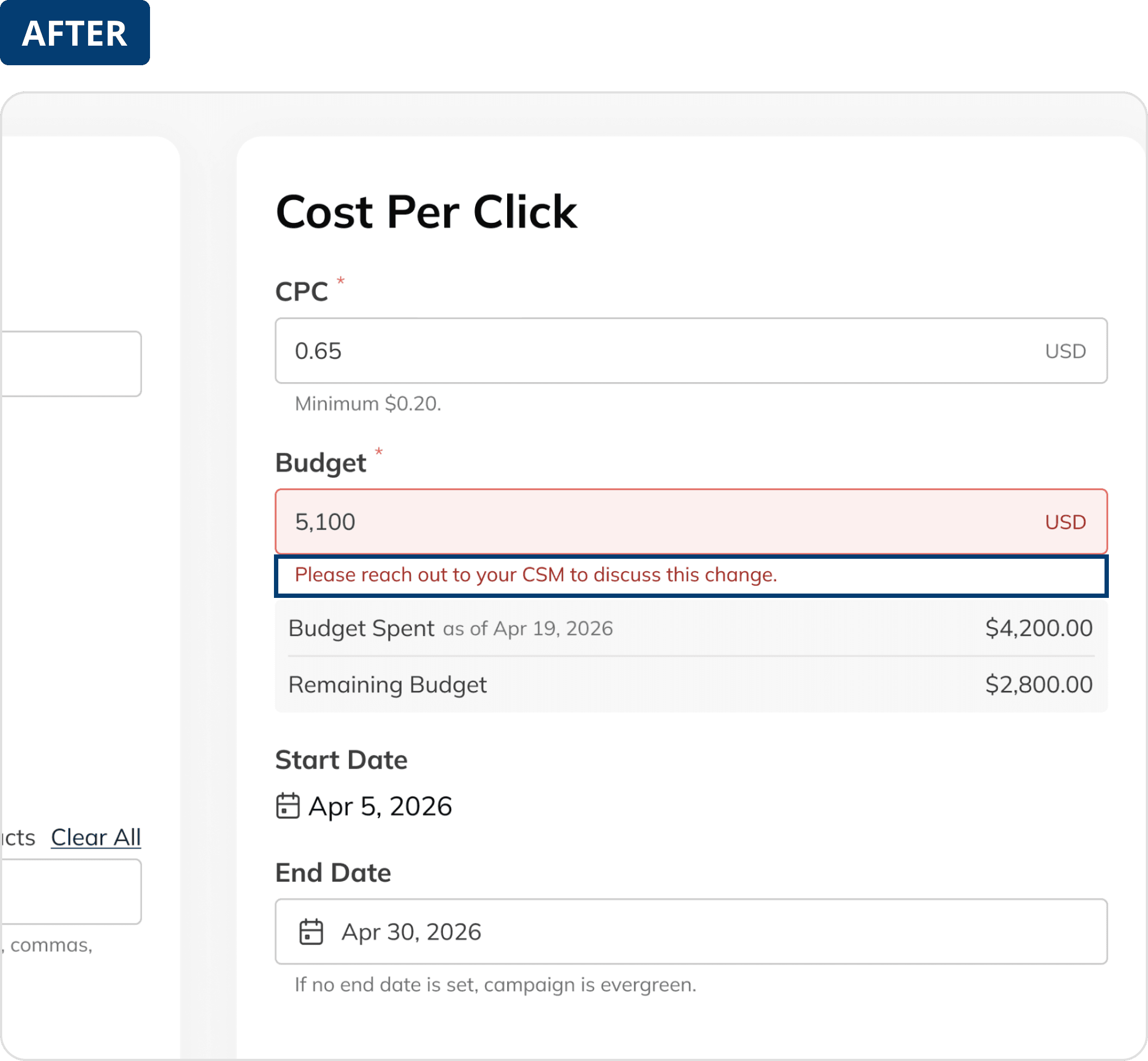
When the threshold is exceeded, validation directs the client to contact their CSM.
results
Launched in 90 days, replacing a spreadsheet bottleneck
$3-4K Per Day
~50% Less Time
10,000 Campaigns
~1/8 the Cost
Compared with earlier Salesforce and outsourcing estimates
The self-serve portal launched within the original 90-day timeline despite a mid-build pivot and a full redesign of how approvals work. It replaced manual spreadsheets with a system that validates campaigns before they go live, catching the kind of error that once cut a client's invoice from $10,000 to $1,000.
CPC campaigns are already earning $3-4K per day across early adopter clients. Gross profit (what's left after costs) came in under a tenth of the department's pre-launch target, which assumed that removing the bottleneck alone would drive much higher revenue. However, the portal makes campaigns faster and safer to manage; it doesn't create demand on its own.
Although Phase 2 was deprioritized, we're still acting on feedback from internal users. We're currently working on an account override feature for super admins and approved external users to adjust their own campaign thresholds without waiting on review.
The AI-assisted approach also helped our team as a whole, deliver the portal at an estimated one-eighth of the cost and increased design and development time by roughly eight times. It reduced my design workflow time by 35%, which I covered in more detail under Designing With AI.
reflection
This project changed how I work
The biggest lessons came from how we worked through uncertainty while product, design, and engineering moved in parallel. Our retro helped clarify three practices I’d carry into the next project.
Working through ambiguity 🧠
The project moved quickly, with product, design, and engineering working in parallel while requirements continued to evolve. I prioritized high-impact decisions, stayed closely aligned with my PM, engineer, and QA, and marked unresolved details as TBD rather than treating assumptions as final.
Protecting time for requirements upfront 🕰️
Starting before the PRD was finalized maintained momentum, but led to repeated rework as business rules and edge cases became clearer. In our full-team retro, we agreed that next time, we would allocate more time for product to fully define the requirements—even under a tight deadline—before moving forward.
Making AI-generated changes easier to track 🔎
As engineering used Claude to build the portal, it sometimes added elements beyond the designs I had handed off. This made changes difficult to identify. Next time, engineering and I will have a shared process to review and document AI-generated changes.
